
Why a Computer Desk Chair Matters More Than You Think. In today’s digital world, millions of people spend long hours sitting in front of a computer—working, studying, gaming, or creating content. Whether you are a student, a freelancer, a gamer, or an office professional, one piece of furniture directly impacts your comfort, health, and productivity: the computer desk chair.
Many people invest heavily in laptops, monitors, and desks but overlook the importance of a high-quality computer desk chair. A poor chair can lead to back pain, neck stiffness, shoulder tension, and even long-term posture problems. On the other hand, a well-designed computer desk chair supports your body, improves focus, and helps you work longer without discomfort.
This in-depth guide will help you understand everything you need to know about choosing the right computer desk chair. From types and features to health benefits, materials, budget considerations, and buying tips—this article covers it all.
What Is a Computer Desk Chair?
A computer desk chair is a specially designed seating solution intended for use at a desk while working on a computer. Unlike regular chairs, these chairs are engineered to support the spine, promote proper posture, and provide comfort during extended sitting periods.
Most computer desk chairs come with features such as adjustable height, backrest support, armrests, swivel bases, and wheels. Advanced models include lumbar support, headrests, reclining mechanisms, and breathable materials.
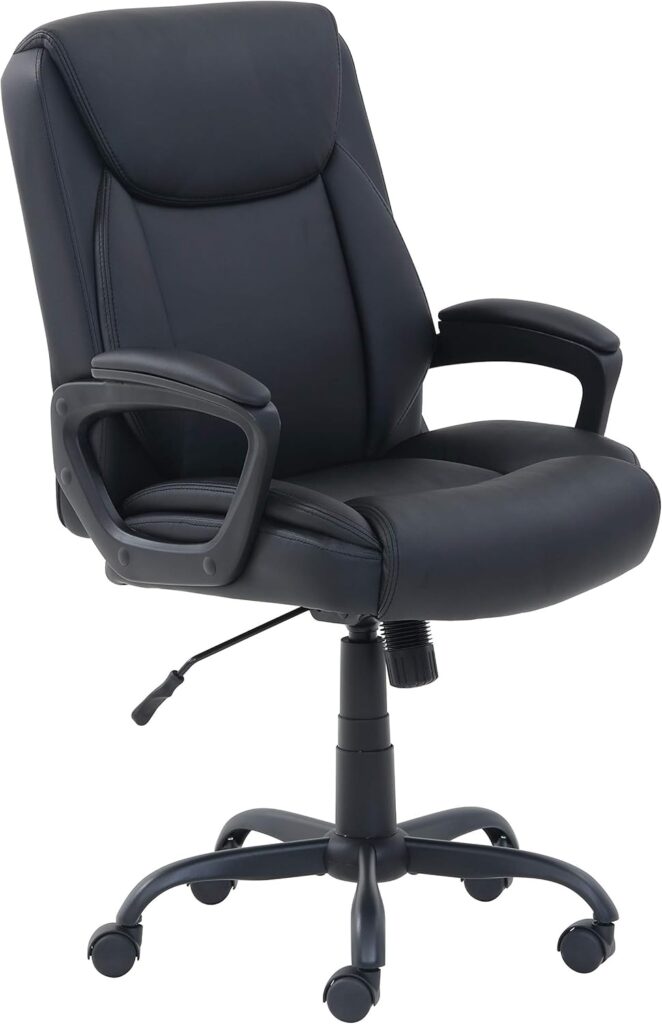
Why Choosing the Right Computer Desk Chair Is Important
1. Improves Posture
A good computer desk chair encourages proper spinal alignment. It supports the natural curve of your spine, preventing slouching and forward head posture.
2. Reduces Health Risks
Sitting for long hours on a poor chair can cause chronic back pain, neck strain, and circulation problems. An ergonomic computer desk chair minimizes these risks.
3. Boosts Productivity
Comfort directly affects focus. When your body feels supported, you can concentrate better and work more efficiently.
4. Prevents Fatigue
An adjustable computer desk chair allows you to change positions, reducing muscle fatigue and stiffness.
Types of Computer Desk Chairs
Understanding different types of computer desk chairs will help you choose the one that best fits your needs.
1. Ergonomic Computer Desk Chair
An ergonomic computer desk chair is designed with health and comfort in mind. These chairs typically include:
- Adjustable seat height
- Lumbar support
- Adjustable armrests
- Reclining backrest
- Breathable mesh or padded fabric
Best for: Office workers, students, and people who sit for 6–10 hours daily.
2. Mesh Computer Desk Chair
Mesh chairs use breathable mesh material on the backrest (and sometimes the seat). This design improves airflow and keeps you cool.
Best for: Hot climates, long working hours, and minimalistic office setups.
3. Leather Computer Desk Chair
Leather computer desk chairs offer a premium look and feel. They are often padded and comfortable but may retain heat.
Best for: Executive offices, formal environments, and style-focused users.
4. Gaming Computer Desk Chair
Gaming chairs are designed for long sitting sessions and often resemble racing car seats. They provide strong back and neck support.
Best for: Gamers, streamers, and content creators.
5. Drafting Computer Desk Chair
These chairs are taller than standard chairs and often include a foot ring.
Best for: Standing desks, drafting tables, and creative workstations.
6. Armless Computer Desk Chair
Armless chairs save space and allow more freedom of movement.
Best for: Small rooms, compact desks, and short sitting periods.
Key Features to Look for in a Computer Desk Chair
When shopping for a computer desk chair, focus on the following features:
1. Adjustable Seat Height
Seat height adjustment ensures your feet rest flat on the floor and your knees are at a 90-degree angle.
2. Lumbar Support
Lumbar support helps maintain the natural curve of your lower back, reducing strain.
3. Backrest Recline and Tilt
A reclining backrest allows you to lean back and relax, reducing pressure on the spine.
4. Armrests
Adjustable armrests reduce shoulder and wrist strain by supporting your arms at desk height.
5. Seat Cushioning
A well-padded seat improves comfort and prevents pressure points.
6. Swivel and Casters
Swivel bases and smooth-rolling wheels make movement easy and improve workspace efficiency.
7. Breathable Materials
Mesh or breathable fabric helps regulate temperature during long sitting sessions.
Ergonomics and Health Benefits of a Computer Desk Chair
Spinal Health
A properly designed computer desk chair supports the spine from the pelvis to the neck, reducing the risk of long-term injuries.
Neck and Shoulder Relief
Chairs with headrests and proper back support help reduce tension in the neck and shoulders.
Improved Blood Circulation
Correct seat height and edge design prevent pressure behind the knees, promoting healthy circulation.
Mental Focus and Comfort
Comfortable seating reduces distractions caused by pain or discomfort, improving mental clarity.
Computer Desk Chair vs Office Chair: Is There a Difference?
Many people use the terms interchangeably, but there can be differences:
- Computer desk chair: Often designed for home use, compact spaces, and personal desks.
- Office chair: Usually built for corporate environments and may offer more durability and advanced ergonomics.
However, many modern chairs combine both functions, making them suitable for home offices and workplaces alike.
Choosing the Right Computer Desk Chair for Your Needs
For Students
Students need affordable, adjustable, and comfortable chairs that fit small study spaces.
For Office Professionals
Look for ergonomic features, lumbar support, and durable materials for long-term use.
For Gamers
Gaming-focused computer desk chairs with headrests, recline, and strong cushioning are ideal.
For Home Offices
Balance comfort, design, and space efficiency.
Materials Used in Computer Desk Chairs
Mesh
- Breathable
- Lightweight
- Modern look
Fabric
- Soft and comfortable
- Available in many colors
- Can absorb heat
Leather or Faux Leather
- Premium appearance
- Easy to clean
- Less breathable
Metal and Plastic Frames
- Metal frames offer durability
- Plastic frames reduce cost and weight
How to Adjust a Computer Desk Chair Correctly
- Adjust seat height so feet are flat on the floor
- Position lumbar support at lower back
- Set armrests at elbow height
- Adjust backrest tilt for comfort
- Ensure monitor is at eye level
Budget Guide: How Much Should You Spend?
- Low Budget: Basic computer desk chairs with minimal adjustments
- Mid-Range: Ergonomic features, better materials
- High-End: Premium build, full adjustability, long warranties
Investing in a quality computer desk chair can save money on health costs in the long run.
Maintenance and Care Tips
- Clean regularly to prevent dust buildup
- Tighten screws periodically
- Avoid overloading weight capacity
- Replace worn-out casters or cushions
Common Mistakes to Avoid When Buying a Computer Desk Chair
- Ignoring ergonomics
- Choosing style over comfort
- Not checking size compatibility
- Buying without adjustability
Environmental and Space Considerations
If you have a small room, choose a compact computer desk chair. For eco-conscious buyers, look for chairs made from recyclable materials.
Future Trends in Computer Desk Chairs
- Smart posture sensors
- Sustainable materials
- Minimalist designs
- Hybrid work-from-home solutions
Frequently Asked Questions About Computer Desk Chairs
How long should a computer desk chair last?
A good-quality chair can last 5–10 years with proper care.
Is an expensive computer desk chair worth it?
If you sit for long hours daily, investing in a high-quality chair is highly beneficial.
Can a computer desk chair improve posture?
Yes, especially ergonomic models designed for spinal support.
Final Thoughts
A computer desk chair is not just another piece of furniture—it is an essential investment in your health, comfort, and productivity. Whether you are setting up a home office, upgrading your study area, or building a professional workspace, choosing the right computer desk chair can make a significant difference in your daily life.
By understanding the types, features, materials, and ergonomic principles discussed in this guide, you can confidently select a chair that meets your needs and budget. Remember, a comfortable body leads to a focused mind—and it all starts with the right computer desk chair.
Computer Desk Chair – Frequently Asked Questions (FAQ)
This comprehensive FAQ section is designed to answer the most common and important questions people ask before buying or using a computer desk chair. These questions and answers are written in an SEO-friendly way and can be used directly on blog posts, eCommerce product pages, or informational websites.
1. What is a computer desk chair?
A computer desk chair is a specially designed chair intended for sitting at a desk while using a computer. Unlike regular dining or plastic chairs, a computer desk chair is built with ergonomics in mind. It usually includes features like adjustable height, back support, swivel movement, and wheels. These features help users sit comfortably for long hours while reducing strain on the back, neck, and shoulders.
2. Why is a computer desk chair important for daily use?
A computer desk chair is important because prolonged sitting on an improper chair can cause back pain, poor posture, muscle stiffness, and fatigue. A well-designed chair supports the natural curve of the spine, helps maintain correct sitting posture, and improves overall comfort. For people who work, study, or game for long hours, using a proper computer desk chair can significantly improve productivity and long-term health.
3. How is a computer desk chair different from a normal chair?
A normal chair is designed mainly for short-term sitting, while a computer desk chair is designed for extended use. Computer desk chairs usually offer ergonomic features such as lumbar support, adjustable armrests, reclining backrests, and smooth-rolling casters. These features allow users to customize the chair according to their body type and desk height, which is not possible with a standard chair.
4. What features should I look for in a good computer desk chair?
When choosing a computer desk chair, look for adjustable seat height, proper lumbar support, a comfortable backrest, armrests, and good cushioning. Breathable materials like mesh are ideal for long hours, especially in warm climates. A swivel base and durable wheels also add convenience and flexibility, making movement around the desk easier.
5. Is an ergonomic computer desk chair really necessary?
Yes, an ergonomic computer desk chair is highly recommended, especially if you sit for more than 4–6 hours a day. Ergonomic chairs are designed to support the spine, reduce pressure on joints, and encourage proper posture. Over time, this helps prevent chronic back pain, neck stiffness, and posture-related problems that often develop from using non-ergonomic chairs.
6. Can a computer desk chair help reduce back pain?
A good-quality computer desk chair can help reduce back pain by providing proper lumbar and back support. Chairs that support the lower back help maintain the spine’s natural curve and prevent slouching. However, correct sitting posture and regular breaks are also important along with using the right chair.
7. What is the ideal sitting position on a computer desk chair?
The ideal sitting position is when your feet are flat on the floor, knees are at a 90-degree angle, and your lower back is supported by the chair’s lumbar support. Your elbows should rest comfortably on the armrests at desk height, and the computer screen should be at eye level. Adjusting your computer desk chair correctly is essential for maintaining this posture.
8. Are mesh computer desk chairs better than leather ones?
Mesh computer desk chairs are better for breathability and temperature control, making them ideal for long hours and warm environments. Leather computer desk chairs, on the other hand, offer a premium look and soft cushioning but may retain heat. The best choice depends on personal preference, climate, and usage duration.
9. How much should I spend on a computer desk chair?
The price of a computer desk chair varies based on features, materials, and build quality. Budget chairs are suitable for light use, while mid-range chairs offer better ergonomics and durability. If you use your chair daily for long hours, investing in a higher-quality computer desk chair is a wise decision for long-term comfort and health.
10. Is a gaming chair suitable as a computer desk chair?
Yes, gaming chairs can be used as computer desk chairs because they are designed for long sitting sessions. Many gaming chairs provide headrests, lumbar pillows, and reclining features. However, some gaming chairs focus more on style than ergonomics, so it’s important to choose one that offers proper back support.
11. What size computer desk chair should I choose?
The right size computer desk chair depends on your height, weight, and desk size. The seat should be wide enough to sit comfortably, and the backrest should support your entire back. Always check the chair’s height range and weight capacity to ensure it matches your body requirements.
12. Are armrests necessary on a computer desk chair?
Armrests are helpful because they reduce strain on the shoulders, neck, and wrists. Adjustable armrests are ideal, as they allow you to position your arms comfortably while typing or using a mouse. However, for small desks or limited space, armless computer desk chairs can also be a practical option.
13. How long does a computer desk chair usually last?
A good-quality computer desk chair can last anywhere from 5 to 10 years, depending on usage and maintenance. Chairs with strong frames, quality casters, and durable materials tend to last longer. Regular cleaning and tightening of screws can extend the chair’s lifespan.
14. Is a computer desk chair suitable for students?
Yes, a computer desk chair is ideal for students who spend long hours studying or attending online classes. An adjustable and comfortable chair helps students maintain good posture, reduces fatigue, and improves focus during study sessions.
15. Can I use a computer desk chair for work-from-home setups?
A computer desk chair is one of the most important items for a work-from-home setup. Since remote workers often sit for long hours, having a supportive and ergonomic chair helps prevent discomfort and improves productivity.
16. How do I maintain and clean a computer desk chair?
To maintain a computer desk chair, clean it regularly using a soft cloth or vacuum. Mesh chairs can be cleaned with mild soap and water, while leather chairs should be wiped with a damp cloth. Periodically check screws, wheels, and adjustment mechanisms to ensure smooth operation.
17. Are computer desk chairs good for posture improvement?
Yes, when used correctly, computer desk chairs can help improve posture. Chairs with lumbar support and adjustable features encourage proper sitting habits, which over time can correct poor posture caused by slouching or improper seating.
18. Can children use computer desk chairs?
Children can use computer desk chairs as long as the chair is adjustable to fit their height. Adjustable seat height and proper back support are essential to ensure children sit comfortably and safely while studying or using a computer.
19. What is the weight limit of a computer desk chair?
Most computer desk chairs come with a specified weight capacity, typically ranging from 100 kg to 150 kg or more. Always check the manufacturer’s specifications to ensure the chair can safely support the user’s weight.
20. Is a computer desk chair worth the investment?
Yes, a computer desk chair is absolutely worth the investment. Since sitting is a major part of daily life for many people, investing in a comfortable and supportive chair improves health, productivity, and overall quality of life.